产品说明Guide

V15 新功能介绍V15 New Features Guide

HelloRadio V15 · 多功能飞行助手 · 测电 · 测信号。HRS Tools 把信号变得看得见、摸得着。 HelloRadio V15 · flight assistant · power & signal measurement. HRS Tools makes signals visible and measurable.

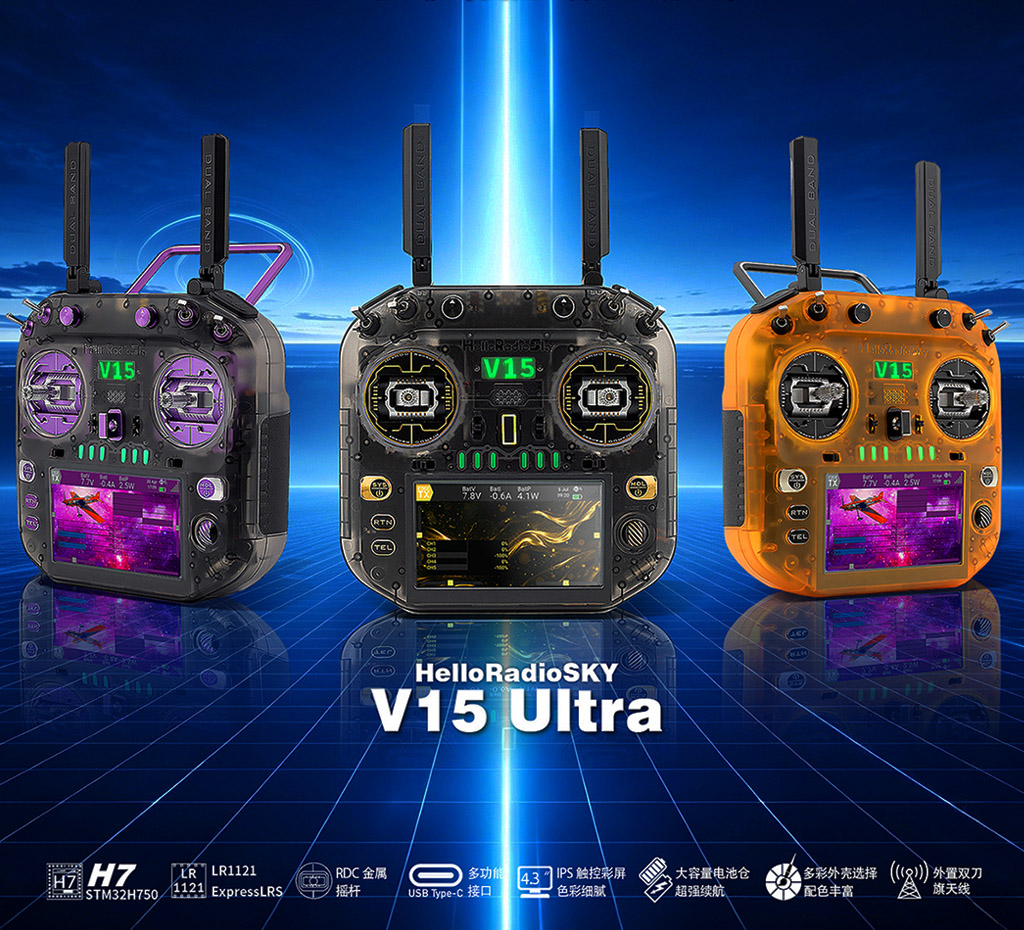
V15 front V15 angle V15 back

HelloRadio V15 遥控器,不再仅仅是一台遥控器,更是一台多功能的飞行助手。 全球首创:一台遥控器能让信号无从遁形——测电、测信号,无所不能。 HelloRadio V15 is more than a radio — it is a multifunctional flight assistant. Measure power and signals on one transmitter; less guessing, more seeing.
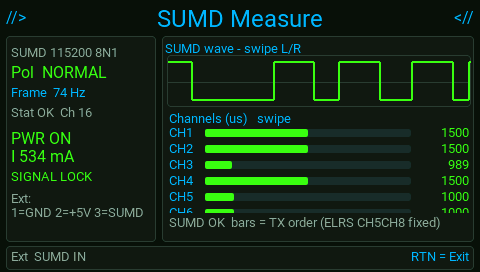
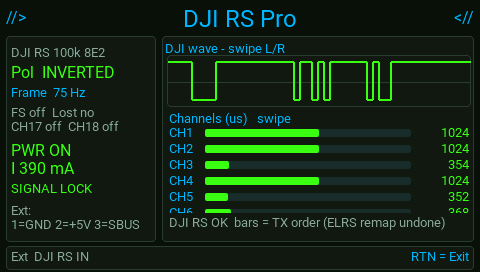
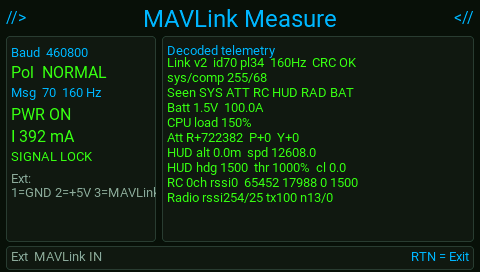
自动探测信号:PWM、PPM、SBUS、CRSF、SUMD、DJI RS、MAVLink,并进入信号测量。好比一台自动扫描仪,让信号看得见。 Auto-detect signals: PWM, PPM, SBUS, CRSF, SUMD, DJI RS, MAVLink — then open signal measurement. Like an automatic scanner that makes signals visible.

1. 入口与接线1. Entry & wiring

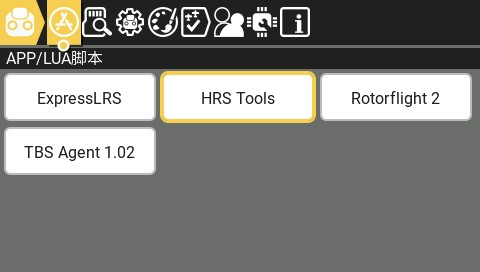
打开:系统菜单 → APP / LUA 脚本 → HRS Tools → 选择工具。按 RTN 返回。 Path: System menu → APP / LUA → HRS Tools. Press RTN to go back.

脚位Pin 名称Name 作用Role
1GNDGround
2+5V约 5V / 1A 外供(可选)~5 V / 1 A optional supply
3SIG信号输入或输出Signal in or out
建议顺序:先接 GND → 再接 SIG → 最后按需接 +5V。SIG 必须 ≤ 5V。 Connect GND first, then SIG, then +5V if needed. SIG must be ≤ 5 V.

2. 通用安全2. Safety

  • SIG 必须 ≤ 5V,超压会拦截测试SIG over-voltage blocks the tool
  • 外供 +5V 有约 +1000 mA 过流切断~+1000 mA jump on Ext +5V trips over-current cut-off
  • 同时只能开一种 Ext 功能Only one Ext tool active at a time
  • 电调动力电池必须自备;脚 2 不能驱动电机ESC needs its own pack — pin 2 will not power the motor
  • 大扭力舵机建议外供,勿长期靠脚 2 硬顶Prefer external power for large servos
一台 V15 即可覆盖识别协议、看波形、测舵机、测电调,减少携带专用测试器。 One V15 covers protocol ID, waveform, servo and ESC checks — fewer dedicated testers to carry.

2.1 接收机信号测试:为什么特别有用2.1 Why RX measurement helps

装机时最常见的尴尬:线已经接上、设备都通电了,却完全不工作。这时通常只剩两件事,肉眼很难分清: Wired and powered, but nothing moves? Usually either wrong protocol selected or no signal at all — hard to tell by eye.

  1. 飞控 / 设备选错了信号类型(例如实际是 CRSF,却配成了 SBUS)Wrong protocol on the FC / device (e.g. CRSF wired, SBUS selected)
  2. 根本没有信号(虚焊、接错脚、RX 未绑定、线断、共地不良)No signal (cold joint, wrong pin, unbound RX, broken wire, bad ground)
HRS 测量就是把信号看明白: HRS measurement makes the signal clear:
  • Pulse Scope → 线上有没有脉冲 / 边沿——看得见、摸得着,少盲目猜测(有电 ≠ 有信号)Pulse Scope — activity on the wire? See and measure it — less blind guessing (power ≠ signal)
  • Auto Measure → 这是哪一种协议——像扫描仪,不用你猜该开哪个测试Auto Measure — which protocol? Auto scanner — no need to pick a test page
  • 协议测量页 → 帧率、掉帧、FS、通道是否在动Protocol page — frames / FS / channels moving?
口诀:硬件接好却不工作,先测量。把信号看明白,再改配置。 If it is connected but dead: measure first. See the signal, then change settings.

3. 四个入口总览3. Hub tools

机内名称Name 作用Purpose
Auto Measure自动扫描仪:不用先懂协议、不用猜开哪个测试页Auto scanner — no protocol homework, no guessing which test to open
Pulse Scope看得见、摸得着:波形+数字,少盲目猜测See & measure the waveform — less blind guessing
Servo Tester输出 PWM,手调 / 扫频 / 摇杆PWM out: Manual / Auto / Stick
DShot Tester输出 DShot150 / 300DShot150 / 300; remove props

PWM / PPM / SBUS / CRSF / SUMD / DJI RS / MAVLink 测量页由 Auto 锁定后自动打开,不是独立入口。 PWM / PPM / SBUS / CRSF / SUMD / DJI RS / MAVLink pages open from Auto after lock.

4. Auto Measure · 自动识别4. Auto Measure

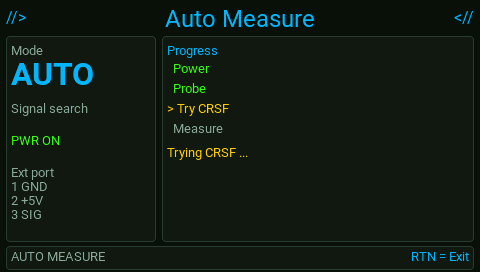
探测 SIG,自动区分 PWM、PPM、SBUS、CRSF、SUMD、DJI RS、MAVLink,并进入对应页面。好比一台自动扫描仪:接上线,让它扫。 Probe SIG and auto-detect PWM / PPM / SBUS / CRSF / SUMD / DJI RS / MAVLink, then open the matching page — like an auto scanner.

  1. RX / 飞控信号接脚 3,GND 接脚 1(需供电可接脚 2)Wire RX signal to pin 3, GND to pin 1 (+5V on pin 2 if needed)
  2. 进入 Auto,等待探测与锁定Enter Auto and wait for probe / lock
  3. 自动跳转协议测量页;丢信号约 1 秒回搜索Jumps to the protocol page; lost signal returns to search in ~1 s

5. Pulse Scope · 脉冲测量5. Pulse Scope

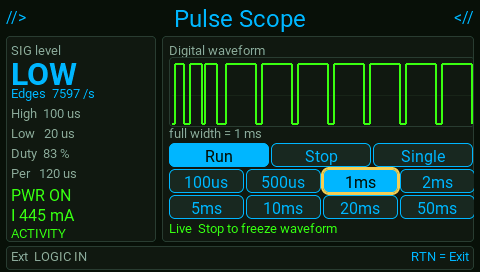
显示高低电平滑变、脉宽、周期、占空比、边沿频率。不解 SBUS/CRSF 通道。把信号变得看得见、摸得着。 Shows edges, pulse width, period, duty and edge rate. Does not decode SBUS/CRSF channels — see and measure first.

  1. 信号接脚 3Signal on pin 3
  2. 选时基(约 100 µs~50 ms 全屏宽度)Pick timebase (~100 µs–50 ms full width)
  3. Run 实时 / Stop 冻结 / Single 单次Run / Stop / Single

6. Servo Tester · 舵机测试6. Servo Tester

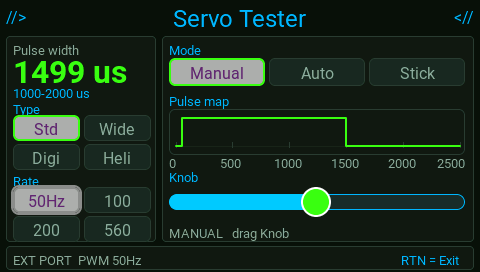
输出舵机 PWM,验证行程、方向、卡顿与电流。 Output servo PWM to check travel, direction, binding and current.

  1. 阅读安全提示后进入Read the safety prompt, then enter
  2. 选 Type(Std / Wide / Digi / Heli)与 RatePick Type (Std / Wide / Digi / Heli) and Rate
  3. Mode:Manual 滑条 · Auto 扫频 · Stick 摇杆驱动Mode: Manual / Auto sweep / Stick
  4. 观察脉宽与 mA;过流会锁定切断Watch µs and mA; over-current locks and cuts power
Heli / 高压舵机请按界面使用 8–13V 外供。 Heli / HV servos: use 8–13 V external supply as shown on screen.

7. DShot Tester · 电调测试7. DShot Tester

必须拆桨。电调接自己的动力电池。 Remove props. ESC on its own battery.

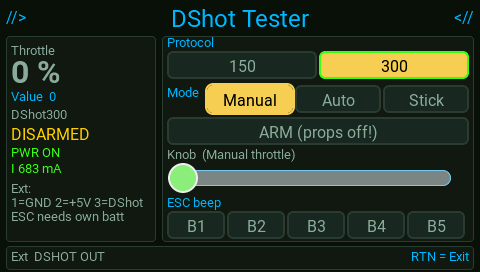
输出 DShot150 / 300,检查电调与油门响应。 Output DShot150 / 300 to check ESC and throttle response.

  1. 拆桨 → 信号接脚 3 → 电调接动力电池Props off → signal on pin 3 → ESC on pack
  2. 选协议;先 DISARM 再接线Select protocol; stay DISARM while wiring
  3. ARM 后 Manual / Auto / Stick 加油门ARM, then Manual / Auto / Stick throttle

8. 协议测量页(Auto 打开)8. Protocol pages

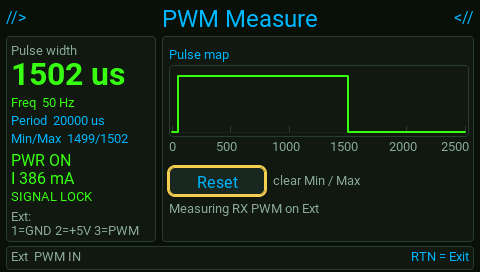
  • PWM脉宽 / 频率 / MinMaxpulse / Hz / min-max
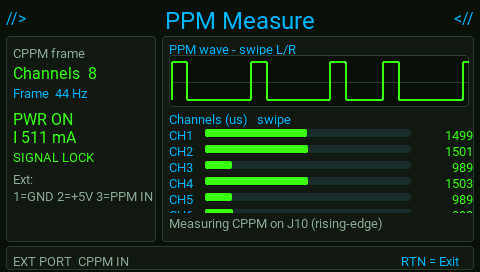
  • PPM多通道 CPPMmulti-channel CPPM
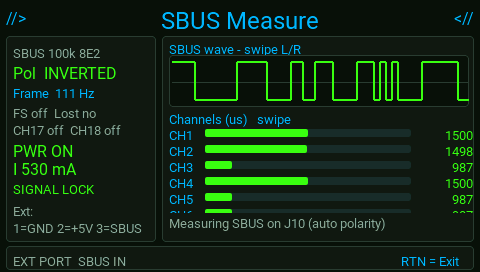
  • SBUS自动极性;FS / 掉帧auto polarity; FS / frame lost
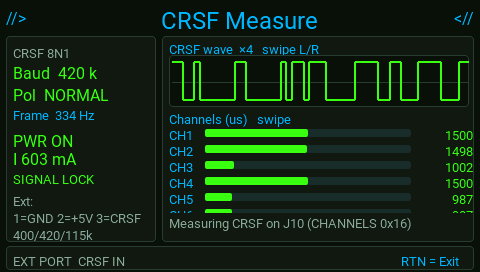
  • CRSF自动波特与极性(ELRS / Crossfire)auto baud/polarity (ELRS / Crossfire)
  • SUMD — Graupner SUMD
  • DJI RSRS 类 100k 8E2RS-style 100k 8E2
  • MAVLink报文 ID / 速率 / 遥测摘要message ID / rate / telemetry lines

9. 相关功能(非四个入口)9. Related features (not hub tiles)

Battery Meter

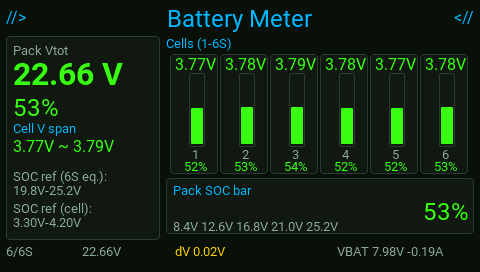
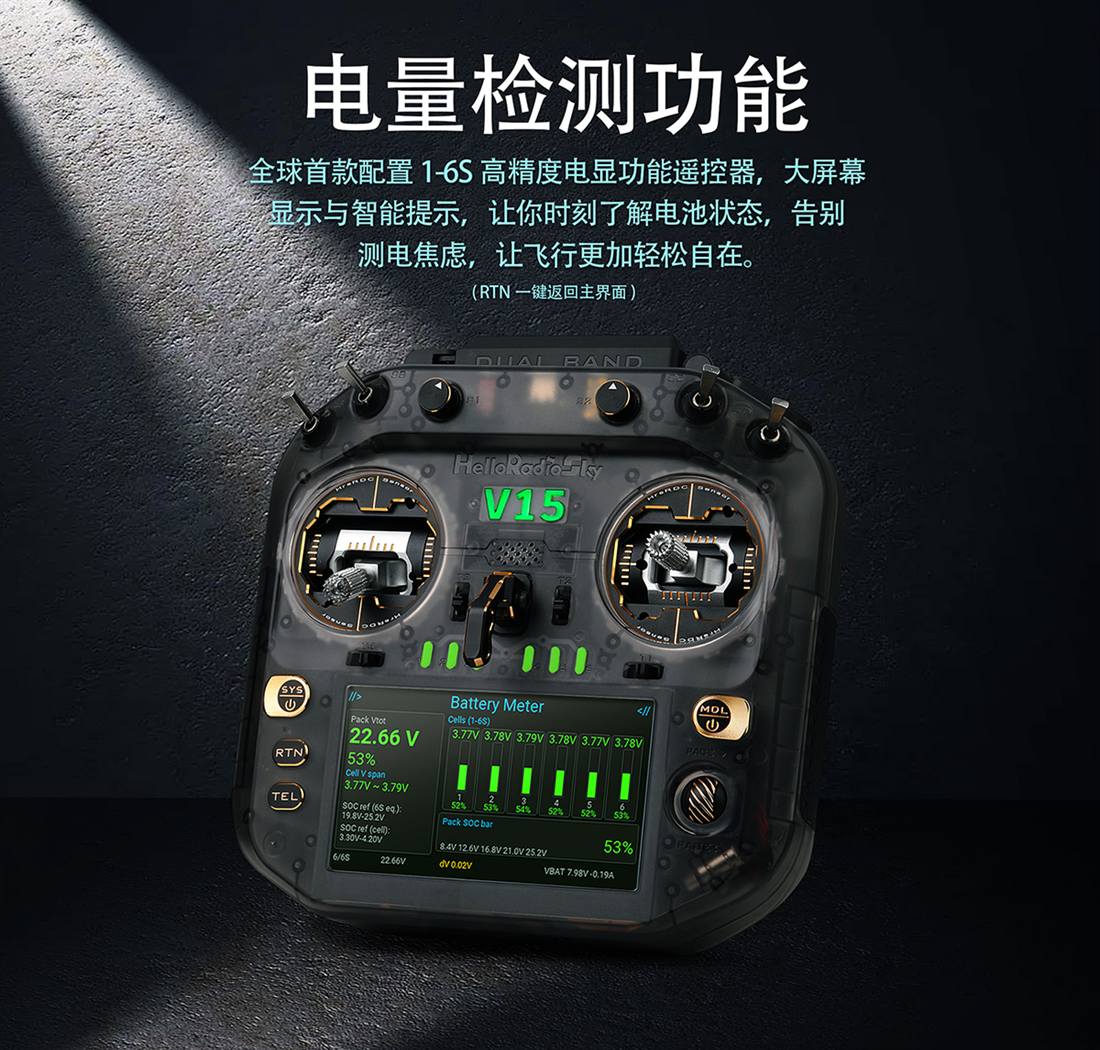
接上平衡口传感后自动弹出。显示 1–6S 单芯电压柱状图、总压、包级 SOC,以及芯间压差 dV;可与机身 VBAT / 电流同屏对照。飞前快速看电池是否不平衡、是否该换电。拔掉传感即关闭。 Opens automatically when the balance sensor is connected. Shows 1–6S per-cell bars, pack voltage, SOC, and cell delta dV, alongside radio VBAT / current. Quick pre-flight check for imbalance or a tired pack. Unplug to close.

Charge Status

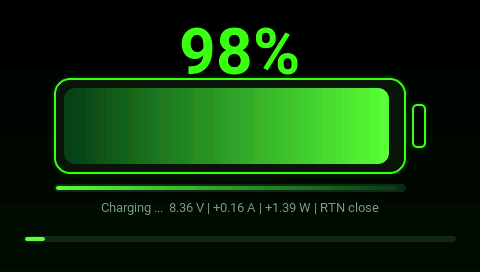
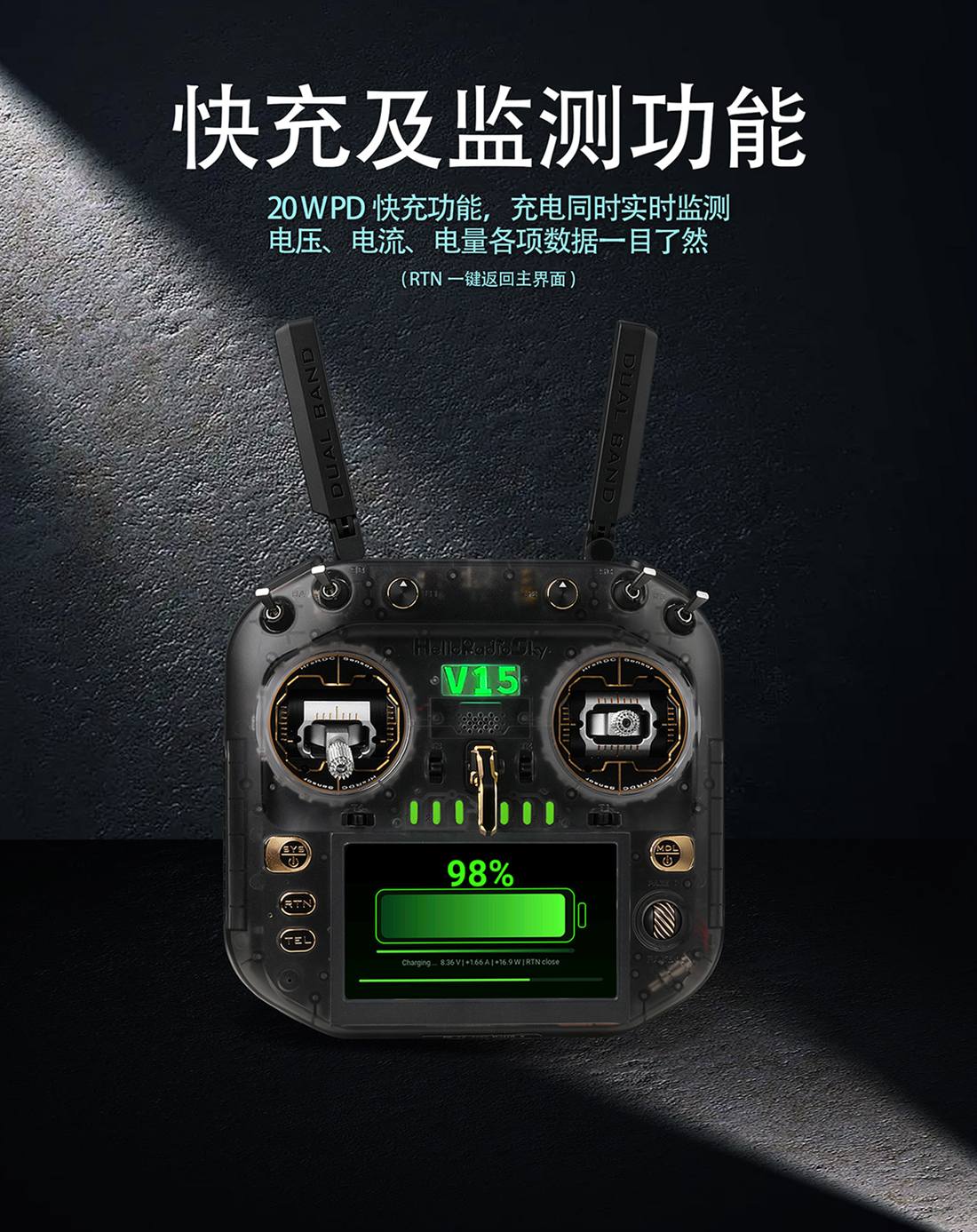
插入支持 PD 的 USB-C 充电器时进入充电监测:大号 SOC,以及实时 电压 / 电流 / 功率。确认是否在快充、功率是否达标;按 RTN 可关闭提示继续操作。 Appears when a PD USB-C charger is plugged in: large SOC plus live V / A / W. Confirm fast-charge and real power delivery; press RTN to dismiss and keep working.

这两项不在 HRS Tools 四宫格入口里,但同属 V15「测电」能力:平衡口查电芯,USB-C 看充电。 Neither is a hub tile, but both belong to V15 power tools: balance lead for cells, USB-C for charging.

10. 推荐工作流10. Suggested workflow

场景Case 建议Do this
装机接好却不工作Installed but dead Pulse Scope 看有无边沿 → Auto 认协议 → 对照飞控信号类型Pulse Scope (any edges?) → Auto (which protocol?) → match FC settings
不知输出什么Unknown RX Auto Measure
信号异常Glitch Pulse Scope
新舵机 / 拉杆Servos Servo Tester
新电调ESC 拆桨 → DShot TesterProps off → DShot Tester
飞前电池Pre-flight pack Battery Meter
充电是否正常Charging check Charge Status
排障口诀:先看有没有信号,再看是什么信号,最后才改飞控参数。 Troubleshoot: see if there is a signal, see what it is, then change FC settings.

11. 常见问题11. FAQ

提示 unsafe / blocked? SIG > 5V,断开高压后再试。 Unsafe / blocked? SIG > 5 V — disconnect high voltage and retry.

Auto 识别不了? 查共地;用 Pulse Scope 确认有边沿。 Auto cannot lock? Check common ground; use Pulse Scope for edges.

舵机不转? 核 Type/Rate、改外供、看是否过流锁定。 Servo dead? Check Type/Rate, use external power, watch over-current lock.

电调无反应? 拆桨、动力电池、协议一致、已 ARM。 ESC silent? Props off, pack connected, matching protocol, armed.
HelloRadioSky · V15 系列HelloRadioSky · V15 Series

HelloRadio V15

高性能开源遥控,把调机实验室带进机身。金属摇杆 · H7 · EXT 多功能口 · 6S 电显 · 20W PD · AI 语音 High-performance open-source radio with a bench lab on board. Metal gimbals · H7 · EXT port · 6S meter · 20W PD · AI voice.

HelloRadioSky V15 Ultra
7
测试工具Test Tools
3pin
EXT 口接线EXT Port
16ch
协议通道解析Channels
1A
过流保护OC Protect
6S
单芯电显Cell Meter
20W
PD 快充PD Charge

集成多功能测试器:调机好助手All-in-one tester: your bench-side helper

实机切屏预览 · 点任一工具查看说明,或继续向下了解产品与接线 Live UI previews · tap a tool for details, or keep scrolling for the product & wiring

全部说明 ↓Full details ↓
产品说明Product Overview

HelloRadioSky V15 Ultra

HelloRadioSky V15 Ultra
  • 01 大屏操控Big-screen Control 4.3″ IPS 高清彩屏,ColorLCD 触控操作更直观。 4.3″ IPS color display with intuitive ColorLCD touch control.
  • 02 全能手感Pro Feel RDC 金属摇杆 · 双频天线 · 透彩机身细节。 RDC metal gimbals · dual-band antennas · translucent body.
  • 03 调机实验室固件Bench-lab Firmware HRS Tools:自动识别 / 波形 / 舵机 / DShot · 6S 电显 · 20W PD · AI。 HRS Tools: Auto / Scope / Servo / DShot · 6S meter · 20W PD · AI.
  • 04 升级 EdgeTXPowered by EdgeTX ColorLCD 生态 + V15 专属 hrs 工具。 ColorLCD ecosystem + V15-only hrs tools.
V15 独有V15-Exclusive

为这台硬件定制的固件能力Firmware built for this hardware

V15 Only
🔌

EXT 多功能测试口EXT Multi-Function Port

1=GND / 2=+5V / 3=SIG。统一入口 HRS Tools:自动识别协议、Pulse Scope 波形、舵机 / DShot 输出;同一时刻只开一种功能,开测前检测 SIG 电压(>5V 拦截)。1=GND / 2=+5V / 3=SIG. One HRS Tools hub: Auto protocol detect, Pulse Scope, Servo / DShot out; one function at a time; SIG >5V blocked before path opens.

V15 Only
🔋

1–6S 高精度电池检测1–6S Battery Meter

逐芯柱状图、压差 dV、包级 SOC,机身 VBAT/电流同屏。Per-cell bars, dV, pack SOC, plus radio VBAT/current.

V15 Only

20W PD + 实时功率20W PD + Live Power

USB-C 快充同时显示电压、电流、功率与 SOC。USB-C fast charge with live V / A / W / SOC.

使用入口How to Open

从 APP / LUA 脚本进入调机实验室Open the bench lab from APP / LUA Scripts

调机测试统一收在 HRS Tools:系统菜单 APP/LUA脚本 里只看到这一项。进入后选 Auto Measure / Pulse Scope / Servo / DShot。同一时刻 EXT 口只跑一种功能。 All bench tests live under one HRS Tools entry in APP/LUA Scripts. Inside: Auto Measure, Pulse Scope, Servo, DShot. Only one EXT function at a time.

APP/LUA Scripts · HRS Tools

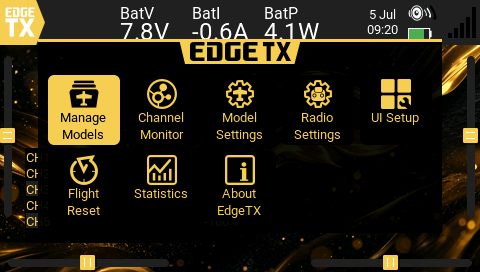
实机界面:顶栏点开 APP(「A」图标)→ 标题为 APP/LUA脚本 → 选择 HRS Tools → 进入四个功能页。 On device: open APP (letter “A”) → APP/LUA ScriptsHRS Tools → pick one of the four tools.

01

打开系统菜单Open system menu

进入主界面系统菜单,选择顶栏 APP 图标。From the main UI, open the system menu and tap the top APP icon.

02

进入 APP/LUA脚本Open APP/LUA Scripts

页面标题为「APP/LUA脚本」,与其它 Lua 工具同页列表。You should see “APP/LUA Scripts”, listed with other Lua tools.

03

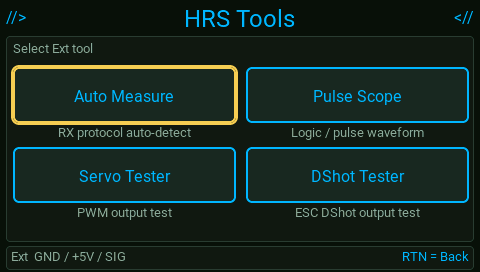
打开 HRS ToolsOpen HRS Tools

Auto Measure · Pulse Scope · Servo · DShotAuto Measure · Pulse Scope · Servo · DShot

04

接线 · 读屏 · 逐级返回Wire · read · step back

接好 Ext 口后测试;按 RTN 先回 HRS Tools,再回 APP 列表。Wire Ext, run the test; RTN returns to HRS Tools, then the APP list.

接线Wiring

EXT 口 · 一根线三种用途EXT Port · one connector, three roles

机身外部扩展口(EXT)。输出可给被测件供电;输入测量时也可由 2 脚供 +5V。认准脚位即可,无需关心电路位号。 The external expansion port (EXT). Output can power the DUT; input measure can supply +5V on pin 2. Just use the pinout — ignore schematic labels.

EXT PORT PINOUT
1
GND公共地,务必先接Common ground — connect first
2
+5V受保护供电,过流约 1A 保护Protected supply · ~1A OC trip
3
SIGPWM / DShot 输出,或协议 / 波形输入PWM / DShot out, or protocol / scope in
⚠ 开测前自动检测 SIG 电压,高于 5V 全屏拦截,不会把高压接到 MCU。舵机 / ESC 测试前确认行程与 ARM;OVERCURRENT 立即断开。电调电机电源须另接电池,测试前拆桨。 ⚠ SIG voltage is probed first — >5V blocks with a full-screen warning so MCU stays safe. Confirm travel & ARM for servo/ESC; on OVERCURRENT, disconnect. ESC needs its own pack — props off.
  • 自动识别 RX:SIG → 脚 3 → HRS Tools → Auto Measure。识别 PWM / PPM / SBUS / CRSF / SUMD / DJI RS / MAVLink 后自动进入对应测量页;信号丢失约 1 秒会回到搜索,换线即可再识别。模型设为教练主机时,锁定后 CH1–8 可馈入教练输入。Auto RX: SIG → pin 3 → HRS Tools → Auto Measure. Detects PWM/PPM/SBUS/CRSF/SUMD/DJI RS/MAVLink and opens the matching UI; ~1s signal loss returns to search. In trainer MASTER mode, locked CH1–8 feed trainer input.
  • 看波形:SIG → 脚 3 → Pulse Scope。数字边沿示波,时基 100µs–50ms,适合查脉宽 / 抖动 / 有无活动。Waveform: SIG → pin 3 → Pulse Scope. Digital edge scope, 100µs–50ms/div — pulse width, jitter, bus activity.
  • 测舵机:信号 → 脚 3,电源接 2/1 或外供 → Servo TesterServo: signal → pin 3, power via 2/1 or external → Servo Tester.
  • 测 ESC(DShot):信号 → 脚 3 → DShot Tester;先 DISARM,选协议后再 ARM。ESC (DShot): signal → pin 3 → DShot Tester; DISARM, pick protocol, then ARM.
  • 互斥与返回:同口只开一种功能;RTN 逐级回到 HRS Tools,再回 APP 列表。Mutex & back: one tool at a time; RTN steps back to HRS Tools, then APP list.
详细功能Feature Details

HRS Tools · 四个入口HRS Tools · four entries

APP 列表只显示 HRS Tools。点击截图可放大。协议测量页由 Auto Measure 识别后自动打开,无需单独菜单。 APP list shows only HRS Tools. Tap to enlarge. Protocol measure screens open via Auto Measure — not separate menu items.

HRS Tools hub
01 / HUB

HRS Tools

Single Tools entry · Ext

统一工具箱:2×2 选择 Auto Measure / Pulse Scope / Servo Tester / DShot Tester。RTN 逐级返回,不会一把退出到 APP 列表。 One hub: 2×2 grid for Auto Measure / Pulse Scope / Servo Tester / DShot Tester. RTN steps back one level at a time.

HOW · APP/LUA脚本 → HRS Tools → 点选功能。APP/LUA Scripts → HRS Tools → pick a tool.
  • 菜单更干净,只留一个入口Clean menu — one entry
  • 开测前 SIG >5V 全屏红色警告Full-screen red warn if SIG >5V
HUBExtSAFE
Auto Measure
02 / AUTO

Auto Measure

HRS Tools · smart detect

接上接收机信号后自动扫描:PWM / PPM / SBUS / CRSF / SUMD / DJI RS / MAVLink。锁定后进入对应测量界面;约 1 秒无无信号回到搜索,换线即可再识别——调机换 RX 不用反复进菜单。模型为教练主机时,测量锁定帧可同步馈入教练通道。 Auto-scan RX: PWM / PPM / SBUS / CRSF / SUMD / DJI RS / MAVLink. Opens the matching UI on lock; ~1s no-signal returns to search so you can swap inputs without leaving the hub. With trainer MASTER, locked frames also feed trainer channels.

HOW · SIG → Ext 脚 3 → Auto Measure → 等锁定 → 读通道 / 帧率;丢信号自动重搜。SIG → Ext pin 3 → Auto Measure → wait lock → read channels; auto re-search on loss.
  • 飞控无信号时,先证明「接收机有输出」FC silent? Prove RX is outputting first
  • 极性 / 波特自动尝试;教练主机可边测边训Auto polarity / baud; MASTER trainer can fly while measuring
AUTORE-SEARCHLOCK
Pulse Scope
03 / SCOPE

Pulse Scope

HRS Tools · digital waveform

数字边沿「逻辑分析」:SIG 高低电平、High/Low 脉宽、周期、占空比与 Edges/s;屏显电流与 ACTIVITY。时基 100µs / 500µs / 1ms / 2ms / 5ms / 10ms / 20ms / 50ms;Run / Stop / Single。适合查 PWM 抖动、总线有无活动(不解通道数值时用 Auto)。 Digital edge scope: SIG level, High/Low pulse, period, duty, Edges/s; live mA and ACTIVITY. Timebases 100µs–50ms; Run / Stop / Single. Great for PWM jitter and bus activity (use Auto for decoded channels).

HOW · SIG → 脚 3 → Pulse Scope → 选时基 → Run / Single;Stop 冻结波形。SIG → pin 3 → Pulse Scope → pick timebase → Run / Single; Stop freezes the wave.
  • 一眼看清信号是否在跳See at a glance if the line is toggling
  • 与 Auto 互补:波形 vs 协议解码Complements Auto: waveform vs decode
SCOPE8 TBEDGE
Servo Tester
04 / OUTPUT

Servo Tester

HRS Tools · PWM out

通测市面常见大小舵机:标准 / 宽行程 / 数字 / 直升机等;约 50–560 Hz。脉冲图 + 电流监测——固定翼及舵机驱动模型调机好帮手。 Common servos—std / wide / digital / heli; ~50–560 Hz. Pulse map + current—handy for fixed-wing and servo-driven setups.

HOW · HRS Tools → Servo Tester → Type / Rate → Manual / Auto / Stick → RTN。HRS Tools → Servo Tester → Type/Rate → Manual/Auto/Stick → RTN.
  • 脉宽直读 µs · 过流故障锁定输出Pulse in µs · OC fault locks output
  • 少带一台专用舵机测试器Skip a dedicated servo tester
PWM OUT50–560 HzOC
DShot Tester
05 / OUTPUT

DShot Tester

HRS Tools · DShot out

DShot150 / 300。ARM 门控;Manual / Auto / Stick;Beep B1–B5。电调需自备电池。DShot150 / 300. ARM gate; Manual/Auto/Stick; Beep B1–B5. ESC needs own battery.

HOW · 拆桨 → HRS Tools → DShot → 选协议 → DISARM 接线 → ARM → 缓慢加油门。Props off → HRS Tools → DShot → protocol → DISARM & wire → ARM → throttle slowly.
  • 未 ARM 只发 stopStop-only until ARM
  • 屏显电流 mALive mA on screen
DShot OUTARMBeep
06 / VIA AUTO

协议测量页(由 Auto 打开)Protocol pages (via Auto)

Not separate APP menus · Auto Measure handoff

PWM / PPM / SBUS / CRSF / SUMD / DJI RS / MAVLink 界面仍在固件中,由 Auto 锁定后自动切入。下方为全部协议实机页;丢信号约 1 秒回 Auto,换线即可继续测。 PWM / PPM / SBUS / CRSF / SUMD / DJI RS / MAVLink UIs stay in firmware and open after Auto lock. Full set of screens below; ~1s signal loss returns to Auto so you can swap inputs.

HOW · 只用 Auto Measure;识别成功后自动进入对应页面。Use Auto Measure only; matching UI opens on lock.
PWMPPMSBUSCRSF SUMDDJI RSMAVLink
电源与传感Power & Sensing

电显与充电Battery meter & charge

外接电芯检测弹出 Battery Meter;插入 PD 充电器进入充电监测。 Cell sensing opens Battery Meter; PD supply opens the charge UI.

Battery Meter

Battery Meter

6S 单节柱 · 总压 / SOC · dV 平衡差 · 机身 VBAT。6S cell bars · pack V / SOC · dV · radio VBAT.

Meter promo
HOW · 接平衡传感 → 检测 Cell1 即弹出 → 看 dV;拔掉关闭。Connect balance sensor → opens on Cell1 → check dV; unplug to close.
Charge UI

Charge Status

大号 SOC · 电压 / 电流 / 功率实时。Large SOC · live V / A / W.

PD photo
HOW · PD USB-C → 观察 A / W → RTN 可关提示。PD USB-C → watch A/W → RTN closes prompt.
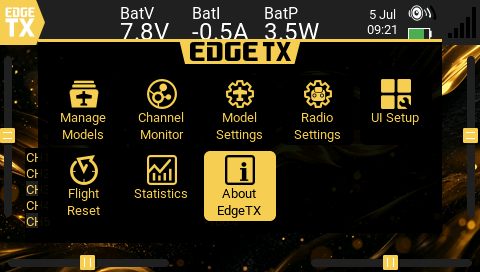
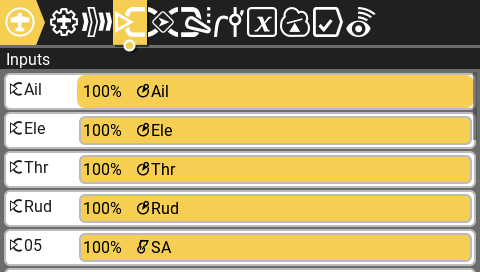
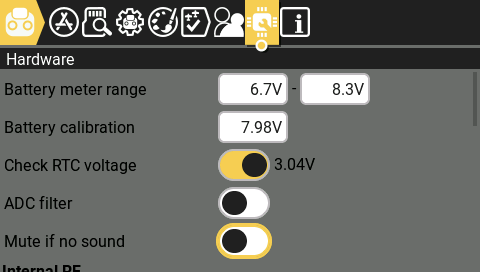
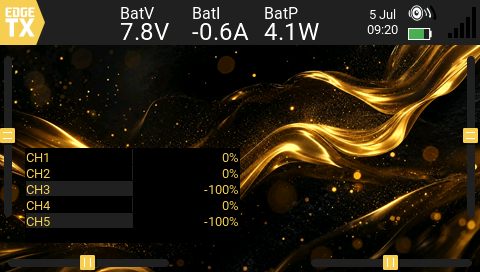
系统界面System UI

EdgeTX ColorLCDEdgeTX ColorLCD

开机仪表与系统页,与 hrs 工具箱同一套霓虹语言。Boot and system pages share the neon language of the hrs toolbox.

Boot
Main
Inputs
Hardware
Radio
Model
刷机教程Flash Guide

V15 固件刷写 · 视频一步到位V15 firmware flash · follow the video

官方 B 站演示 UF2 刷机流程;抖音另有 V15 实用功能速览。也可先下载固件,对照视频操作。 Official Bilibili walkthrough for UF2 flashing, plus a Douyin V15 feature highlight. Download the firmware, then follow the video.

V16 语音V16 Voice

语音控制使用说明Voice Control User Guide

适用于启用 VOICE_CONTROL_SENSOR(CI1302)的遥控器。语言与右上角中/英切换同步。 For radios with VOICE_CONTROL_SENSOR (CI1302). Language follows the top-right EN/中文 switch.

SD 卡 — 必需的系统语音文件SD card — required system sounds

语音控制的 固件内置响应音(唤醒确认、体感 OK、菜单导航 OK)来自 SD 卡 SYSTEM 目录。需自行放入,默认 EdgeTX SD 包通常不包含。 Built-in responses (wake, motion OK, menu OK) use system wav files. Add them yourself — usually not in the default EdgeTX SD pack.

文件File 播放时机When it plays
helloradio.wav识别到唤醒词Wake word recognized
okay.wav启用体感;语音打开菜单页(确认/取消不播放)Motion enabled; menu pages via voice (Confirm/Cancel silent)

目录(与遥控器语音语言一致):Folder (match radio language pack):

SOUNDS/en/SYSTEM/helloradio.wav
SOUNDS/en/SYSTEM/okay.wav

SOUNDS/cn/SYSTEM/helloradio.wav
SOUNDS/cn/SYSTEM/okay.wav
文件名不区分大小写;属于 SYSTEM/ 系统音,不能通过 Special Functions 配置。缺少时语音仍可用,但唤醒 / OK 无声 Names are case-insensitive; under SYSTEM/ — not SF-configurable. Without them, control still works but wake/OK is silent.

唤醒词Wake word

多数指令需先说出唤醒词(播放 helloradio)。会话约 10 秒,每条指令刷新计时。 Most commands need the wake phrase first (plays helloradio). Session lasts ~10 seconds and refreshes on each command.

例外:体感控制不需要唤醒词,可随时直接呼叫。 Exception: Motion control does not need wake — say it anytime.

语音虚拟开关Virtual voice switches

开关Switch 名称Name 类型Type 语音指令Voice command 状态State
VGR 起落架Landing gear 2-pos 开/关起落架Open/Close gear ↓放下 · ↑收起↓ down · ↑ up
VFL 襟翼Flaps 3-pos 开/关襟翼Open/Close flap 0 / 1 / 2
要点:语音只改虚拟开关状态;声音与动作请在 Special Functions 按模型自行配置。 Important: Voice only sets switch state. Define sounds & actions in Special Functions per model.

分工Roles

层级Layer 作用What it does
语音(CI1302)Voice (CI1302) 识别口令 → 设置 VGR / VFLPhrase → set VGR / VFL
特殊功能(你)Special Functions (you) 开关生效 → 播 wav / 置 LS / 改混控等On switch → Play Track / Set LS / mix…
系统 wavSystem wav helloradio.wav · okay.wav · SOUNDS/…/SYSTEM/

配置步骤Setup steps

  1. 将 wav 复制到 SD,如 SOUNDS/cn/SOUNDS/en/Copy wav files to SD, e.g. SOUNDS/en/ or SOUNDS/cn/
  2. 模型 → Special Functions → 新增一行Model → Special Functions → add a line
  3. Switch: VGR↓ / VGR↑ / VFL0/1/2Switch: VGR↓ / VGR↑ / VFL0/1/2
  4. Action: Play Track、Set LS、混控等Action: Play Track, Set LS, mix, etc.
  5. 保存,并对每个语音状态重复Save; repeat for each voice state

示例 — 起落架 + 提示音Example — gear + custom sound

步骤Step 设置Setting
语音Voice「开起落架」→ VGR↓“Open gear” → VGR↓
SF #1VGR↓ → Play Track → gear_down.wav
语音Voice「关起落架」→ VGR↑“Close gear” → VGR↑
SF #2VGR↑ → Play Track → gear_up.wav

未配置 SF 时,开关仍会变位(可用于混控),只是没有自动声音/动作。 With no SF, the switch still changes (usable in mixes) — just no automatic sound/action.

体感控制(IMU)Motion control (IMU)

不是虚拟开关:激活后将 IMU 倾角叠加到 AIL / ELE Not a virtual switch — overlays IMU tilt onto AIL / ELE while active.

项目Item 说明Description
语音指令Command体感控制Motion control
唤醒Wake不需要Not required
反馈Feedbackokay.wav
叠加OverlayΔ Tilt X → AIL · Δ Tilt Y → ELE
启动归零Zero at start记录基准,Δ=0 无跳变Baseline capture, Δ=0 (no jump)
释放ReleaseAIL/ELE 超过约 25% 行程AIL/ELE beyond ~25% travel
固件FirmwareIMU · V16 default
说「体感控制」→ 记录基准 → AIL/ELE = 杆量 + ΔTilt → 大幅推杆释放Say "Motion control" → baseline → AIL/ELE = stick + ΔTilt → large stick releases

语音菜单导航(唤醒后)Voice menu navigation (after wake)

语音指令Voice command 打开页面Opens
Telemetry / Sensor status模型 → TelemetryModel → Telemetry
Model MenuModel Setup
System MenuRadio Setup
Channel Monitor通道监视器Channel monitor
Internal / External ModuleInternal RF / External RF
Confirm / CancelENTER / EXIT

速查Quick reference

类别Category 需唤醒?Wake? 配置Config
SD 系统音SD system wav helloradio.wav + okay.wav → SOUNDS/…/SYSTEM/
VGR / VFL 建议唤醒后After wake SF 自定义 wav 与动作SF — custom wav & actions
体感控制Motion control No 无需None

固件分支:Firmware branch: hrs-V16-Voice-control-3.0

用户留言Feedback

用户反馈Feedback

欢迎留下使用体验、功能建议或问题描述(请勿填写密码等敏感信息) Share feedback, ideas, or issues (please do not post passwords or secrets)

写留言Write a message